
GTA 6 System Requirements: Minimum & Recommended PC Specs
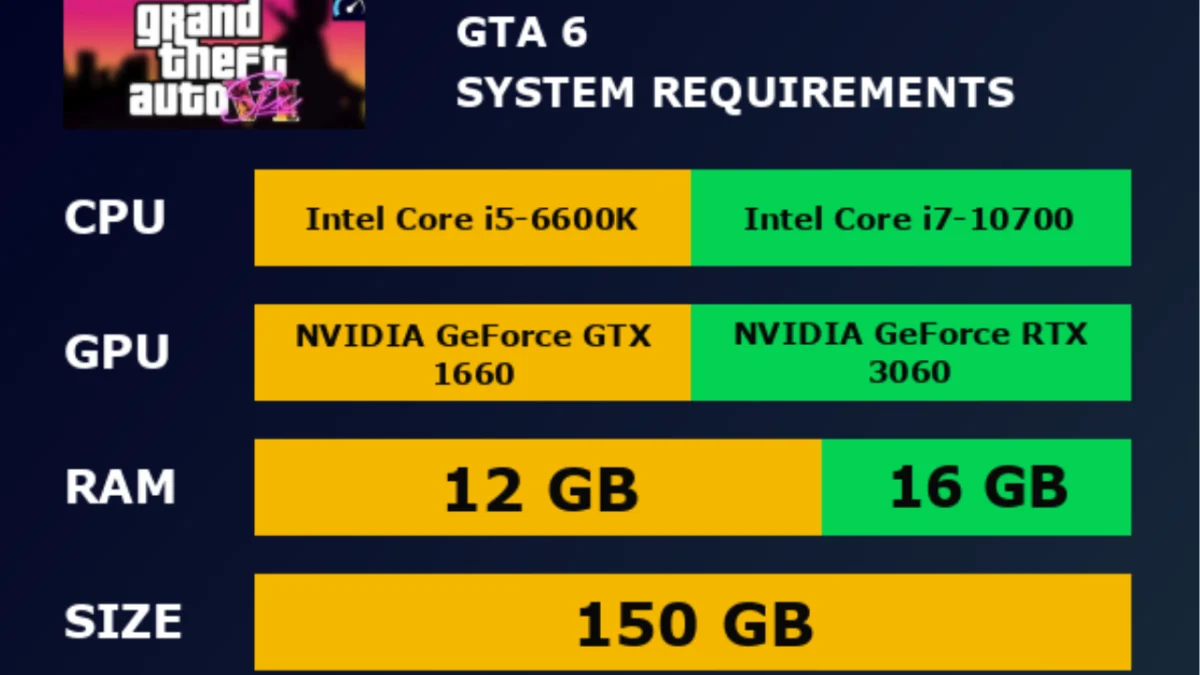
GTA 6 System Requirements are one of the hottest topics among PC gamers. Millions of players want to know if their computers can run Rockstar Games’ biggest title. While Rockstar has not released the official PC requirements yet, many experts have shared realistic hardware expectations based on modern gaming technology and Rockstar’s previous games.
If you plan to play GTA 6 on PC, now is the best time to check your system. A powerful computer can deliver smoother gameplay, faster loading times, and better graphics. Older PCs may still run the game, but they could require lower settings.
In this guide, you’ll learn the expected minimum and recommended PC specs, whether the requirements are official, and what hardware you may need before GTA 6 arrives on PC.

Are GTA 6 System Requirements Official?
The simple answer is no.
Rockstar Games has not officially released the PC system requirements for GTA 6.
The game has been announced for PlayStation 5 and Xbox Series X|S, but Rockstar has not confirmed a PC release date. Because of this, there are no official hardware requirements yet.
Many websites already publish “GTA 6 system requirements.” Most of these are predictions, not official information.
These estimates are based on several factors.
One is the technology used in modern AAA games.
Another is Rockstar’s previous PC releases, including Grand Theft Auto V and Red Dead Redemption 2.
Gaming experts also compare GTA 6 with other large open-world games that use advanced graphics, realistic lighting, and detailed environments.
Until Rockstar publishes official specifications, every hardware list should be treated as an estimate.
For the latest and most accurate updates, always follow Rockstar Games through its official website.
Expected GTA 6 Minimum System Requirements
Although nothing has been confirmed, many experts believe a mid-range gaming PC should be able to run GTA 6 at lower settings.
These expected specifications are designed for players who want stable gameplay without ultra graphics.
Operating System
A 64-bit version of Windows 10 or Windows 11 is expected.
Older operating systems may not support the latest graphics technologies used by GTA 6.
Keeping Windows updated can also improve game performance and security.
Processor (CPU)
The processor handles the game’s world, traffic, physics, and AI.
Many experts expect these CPUs to meet the minimum level:
- Intel Core i7-8700K
- AMD Ryzen 5 3600
Newer processors may provide smoother gameplay, especially in busy city areas.
Memory (RAM)
Most gaming analysts expect 16 GB of RAM to be the minimum requirement.
Modern open-world games use more memory than older titles.
If your PC has only 8 GB of RAM, you may experience slower performance and longer loading times.
Upgrading to 16 GB is one of the easiest ways to improve gaming performance.
Graphics Card (GPU)
The graphics card is one of the most important parts of your gaming PC.
Expected minimum graphics cards include:
- NVIDIA GeForce RTX 2060
- AMD Radeon RX 6600
These GPUs support modern graphics features and should be capable of handling GTA 6 at lower or medium settings.
Players using older graphics cards may need to reduce resolution and visual effects.
DirectX
Most experts believe GTA 6 will require DirectX 12.
DirectX 12 helps games use modern graphics hardware more efficiently.
It can improve performance, lighting effects, and overall visual quality.
Before installing GTA 6, make sure your graphics drivers are fully updated.
Storage
Storage space is becoming more important every year.
Many experts expect GTA 6 to require at least 150 GB of free space.
Installing the game on an SSD instead of a traditional hard drive is highly recommended.
An SSD can reduce loading times and improve texture streaming while exploring the game’s large open world.
Expected GTA 6 Recommended System Requirements
Players who want higher frame rates and better graphics will likely need more powerful hardware.
These recommended specifications are still estimates, but they reflect the performance expected from a next-generation open-world game.
Expected hardware includes:
- Operating System: Windows 11 (64-bit)
- Processor: Intel Core i7-12700K or AMD Ryzen 7 5800X
- Memory: 32 GB RAM
- Graphics Card: NVIDIA GeForce RTX 4070 or AMD Radeon RX 7800 XT
- DirectX: DirectX 12 Ultimate
- Storage: High-speed NVMe SSD with at least 150 GB of free space
A system like this should deliver smoother gameplay, faster loading, and higher graphics settings.
It may also provide better support for advanced features such as ray tracing and improved visual effects if Rockstar includes them in the PC version.
Upgrading your hardware before the official PC release can help you enjoy GTA 6 without major performance issues.
Can Your PC Run GTA 6?
Many players are asking the same question.
Can my PC run GTA 6?
The answer depends on your hardware.
If your computer has a modern processor, at least 16 GB of RAM, a dedicated graphics card, and an SSD, there is a good chance it will be ready for GTA 6. Older systems may still run the game, but you may need to lower the graphics settings for smoother performance.
You can start by checking your PC specifications.
On Windows, open Settings > System > About to see your processor and installed memory. You can also open Task Manager to view your graphics card.
Compare your hardware with the expected GTA 6 system requirements.
If your PC is below the expected minimum level, consider upgrading the graphics card, adding more RAM, or installing an SSD before the game launches.
Preparing early can save money and help you avoid last-minute upgrades.
How Much Storage Will GTA 6 Need?
Rockstar Games has not confirmed the official game size.
However, many gaming experts believe GTA 6 could require 150 GB or more of free storage.
Modern open-world games are much larger than older titles.
They include high-resolution textures, detailed cities, realistic lighting, better sound quality, and large maps. All of these features increase the installation size.
You should also leave extra free space on your drive.
Windows and game updates need additional storage to work properly.
If your SSD is almost full, GTA 6 may not perform as well.
Cleaning unused files before installing the game is a smart idea.
Will GTA 6 Require an SSD?
An SSD is not officially required yet.
Still, many experts believe it will be highly recommended.
Solid State Drives are much faster than traditional Hard Disk Drives (HDDs).
They reduce loading times and improve texture streaming while you move through large open-world environments.
Fast storage also helps prevent slow loading, texture pop-in, and game stuttering.
Many recent AAA games already recommend SSDs because of their performance benefits.
If your gaming PC still uses an HDD, upgrading to an SSD is one of the best improvements you can make before GTA 6 arrives.
An NVMe SSD may offer even faster performance than a standard SATA SSD.
Best Graphics Cards for GTA 6
The graphics card plays a major role in gaming performance.
Since GTA 6 is expected to feature detailed environments and advanced visual effects, a modern GPU will likely provide a better experience.
These graphics cards are expected to perform well:
Budget Choice
- NVIDIA GeForce RTX 3060
- AMD Radeon RX 7600
These cards should handle the game at medium settings in Full HD.
Mid-Range Choice
- NVIDIA GeForce RTX 4070
- AMD Radeon RX 7800 XT
These GPUs are expected to deliver smoother gameplay at higher settings with improved visual quality.
High-End Choice
- NVIDIA GeForce RTX 5080 (or latest available flagship)
- AMD Radeon RX 9070 XT (or latest equivalent)
High-end graphics cards are better suited for ultra settings, higher resolutions, and future graphics technologies.
The official requirements may be different, but newer GPUs are more likely to support GTA 6 over the long term.
Best Processors for GTA 6
A fast processor helps the game handle traffic, pedestrians, physics, missions, and artificial intelligence.
If the CPU is too slow, even a powerful graphics card may not deliver smooth gameplay.
Expected processor choices include:
Entry Level
- Intel Core i5-13400F
- AMD Ryzen 5 7600
These processors should offer solid gaming performance for most players.
Recommended Level
- Intel Core i7-14700K
- AMD Ryzen 7 7800X3D
These CPUs are expected to provide better frame rates in busy areas of the game.
High-End Level
- Intel Core Ultra 9 Series
- AMD Ryzen 9 9950X
These processors are ideal for players who also stream, record videos, or multitask while gaming.
Choosing a balanced combination of CPU and GPU is usually more important than buying only one expensive component.
Will GTA 6 Support Ray Tracing?
Rockstar Games has not confirmed this feature.
However, many gaming experts expect ray tracing to be included in the PC version.
Ray tracing creates more realistic lighting, reflections, shadows, and water effects.
It can make cities, vehicles, and buildings look more natural.
The feature also requires a stronger graphics card.
Players with RTX or newer Radeon graphics cards are more likely to enjoy these advanced visual effects.
If ray tracing becomes available, Rockstar will probably allow players to turn it on or off depending on their hardware.
This gives gamers more control over performance and image quality.
For players who want the best visual experience, a graphics card with dedicated ray tracing support is a smart long-term investment.

How to Prepare Your PC for GTA 6
Preparing your PC before GTA 6 launches can save you time and improve your gaming experience.
Start by checking your hardware.
Make sure your processor, graphics card, RAM, and storage meet the expected GTA 6 system requirements. If one part is too old, upgrading it now may be a better choice than waiting until release day.
Next, update Windows.
The latest Windows updates include security fixes and performance improvements that can help modern games run better.
You should also update your graphics drivers.
Both NVIDIA and AMD regularly release new drivers for upcoming AAA games. Installing the latest version can improve stability and performance.
Free up storage space before installing GTA 6.
Keeping at least 20–30 GB of extra free space helps Windows and future game updates work smoothly.
Finally, keep your PC clean.
Dust inside your computer can increase temperatures and reduce performance. Cleaning your fans and improving airflow can help your system stay cool during long gaming sessions.
Tips to Improve GTA 6 Performance
Even a powerful PC can benefit from a few simple optimizations.
Close background apps before starting the game.
Programs running in the background use memory and processing power.
Install GTA 6 on an SSD whenever possible.
Faster storage improves loading times and helps the game stream large environments more smoothly.
Lower graphics settings if your frame rate is unstable.
Options such as shadows, reflections, and anti-aliasing often have the biggest impact on performance.
Keep your graphics drivers updated.
Driver updates often include game-specific optimizations.
Monitor your PC temperatures while playing.
If your CPU or GPU becomes too hot, the system may reduce performance to protect itself.
If you use a gaming laptop, plug it into the charger and select the High Performance power mode before launching the game.
These small changes can make a noticeable difference.
Common PC Hardware Mistakes to Avoid
Many players spend money on the wrong upgrades.
Avoid these common mistakes before GTA 6 arrives.
Do not ignore the SSD.
A fast graphics card cannot fully solve slow loading caused by an old hard drive.
Do not buy too little RAM.
Modern games continue to use more memory. Upgrading to at least 16 GB is a smart choice.
Do not forget your power supply.
A new graphics card may require a stronger and more reliable power supply.
Do not skip driver updates.
Outdated drivers can cause crashes, poor performance, or graphical issues.
Do not believe fake system requirement lists.
Wait for Rockstar Games to publish the official PC specifications before making expensive hardware upgrades.
Making informed upgrades is usually cheaper than replacing an entire computer later.
Frequently Asked Questions
What are the GTA 6 system requirements?
Rockstar Games has not officially released the PC system requirements yet. Current specifications online are based on expert predictions and modern gaming hardware.
Can GTA 6 run on 16 GB RAM?
Many experts believe 16 GB RAM will be the expected minimum for playable performance, although Rockstar has not confirmed this.
Will GTA 6 need an SSD?
An SSD has not been officially required yet, but it is expected to provide much better loading times and smoother gameplay.
Can I play GTA 6 with a GTX 1660?
There is no official answer. If GTA 6 is highly demanding, older graphics cards like the GTX 1660 may require lower graphics settings for acceptable performance.
How much storage will GTA 6 need?
Most gaming experts expect GTA 6 to require around 150 GB or more of available storage.
Is Windows 11 required for GTA 6?
Rockstar has not confirmed this. However, Windows 10 (64-bit) and Windows 11 are expected to be the supported operating systems.

Conclusion
GTA 6 System Requirements have not been officially announced, but current hardware estimates give PC players a good starting point.
If your PC has a modern processor, 16 GB or more RAM, a capable graphics card, and an SSD, you should be in a strong position when the PC version arrives.
Until Rockstar Games shares the official specifications, avoid trusting fake requirement lists or unofficial downloads. Follow Rockstar’s official announcements and prepare your PC in advance so you can enjoy GTA 6 with the best possible performance from day one.
References
- Rockstar Games – https://www.rockstargames.com
- Grand Theft Auto VI – https://www.rockstargames.com/VI
- Rockstar Support – https://support.rockstargames.com
- NVIDIA – https://www.nvidia.com
- AMD – https://www.amd.com
- Intel – https://www.intel.com
- Microsoft DirectX – https://learn.microsoft.com/directx
- Steam – https://store.steampowered.com


[…] Related reading: GTA 6 System Requirements: PC Specs You May Need […]